Stay Focused

Made for calm, focused work

Version 1.4.0 · For Chrome 120 or later

Chrome extension · Free, with no limits

A calm site blocker and focus timer for Chrome.

Stay Focused blocks the sites that distract you: always, on a schedule, or only during focus sessions. You set it up for yourself: there is no account and no server, and it reports nothing to anyone.

See what it does

Not yet on the Chrome Web Store.

At a glance

Price
Free. Plus is optional.
Goes online
Never, in the free version
Works on
A computer
Language
English
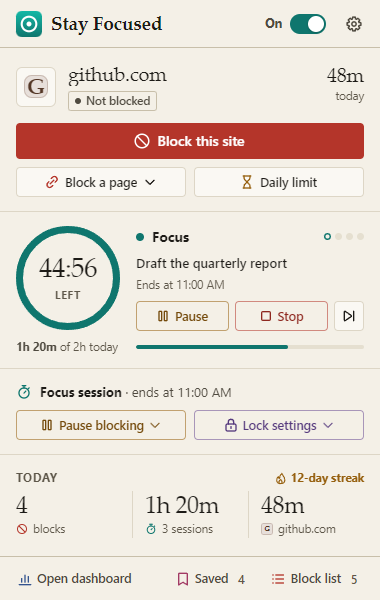
Fig. 1 The toolbar popup during a focus session. Every picture here is a screenshot.
The Stay Focused popup on github.com during a focus session. A red “Block this site” button, a ring showing 44:56 left, the task “Draft the quarterly report”, the buttons Pause, Stop and Skip, and today’s totals: 4 blocks, 1h 20m of focus and a 12-day streak.
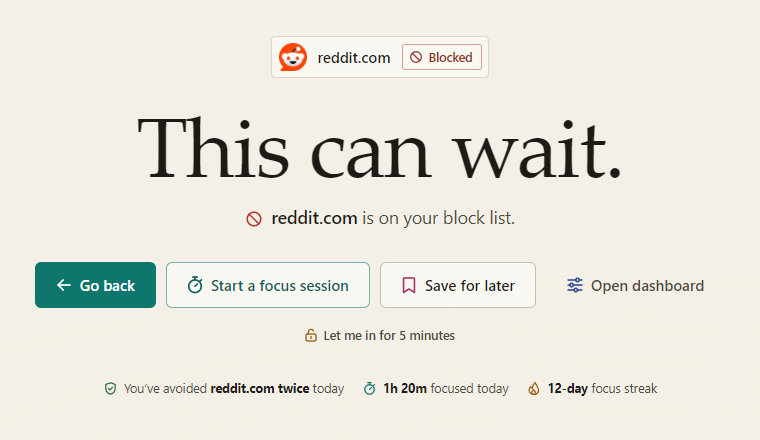
The Stay Focused block page shown instead of reddit.com. The headline reads “This can wait.” Below it: “reddit.com is on your block list”, the buttons Go back, Start a focus session, Save for later and Open dashboard, a “Let me in for 5 minutes” link and today’s numbers.
Fig. 2 The block page, in its default scene.

What you see

A kinder block page

Open a blocked site and Chrome shows this instead, before the request leaves the browser.

  • Save for later parks the link for when blocking stops.
  • Let me in for 5 minutes sits behind your speed bump. You can turn it off.

What it blocks

Keep distractions out of reach

Site
For example reddit.com
The whole site, with every subdomain.
Page
For example youtube.com/shorts
That page and everything under it.
Keyword
For example casino
Any address that contains the word.

Add as many rules as you like. Allow-list mode turns it round: everything is blocked except the sites you allow.
Ready-made categories

Six groups, one switch each

Social media
18 sites
Video & streaming
17 sites
News
26 sites
Shopping
20 sites
Gaming
21 sites
Adult content
24 sites

Edit any of them, or make up to 50 of your own.

When it blocks

Choose when it applies

Whatever you pick, a focus session always switches blocking on.

Always Default
Your block list is enforced around the clock.
On a schedule
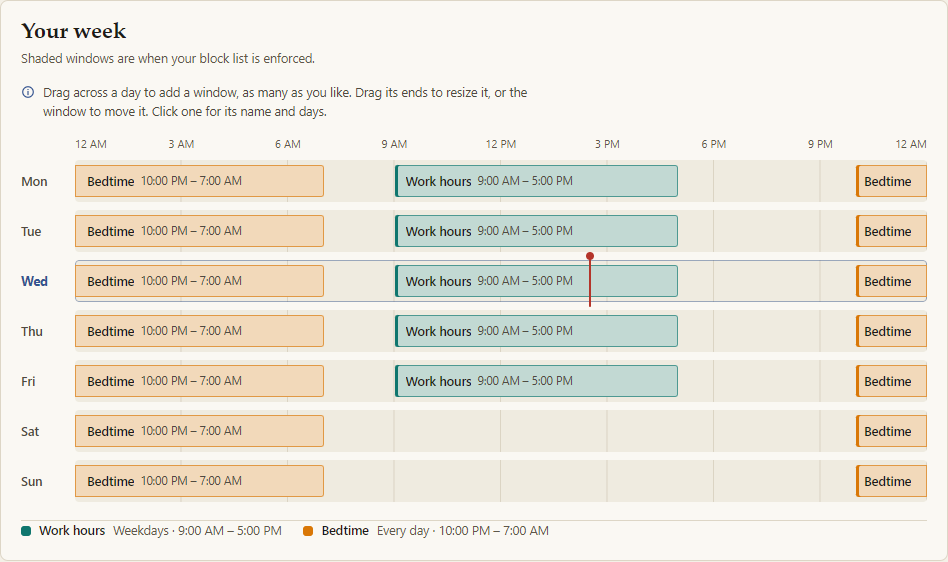
Each window has its own days and times, and overnight windows work.
Only during focus sessions
Blocking switches on when a session starts and off when it ends.
The “Your week” card on the Schedule page: a timeline from Monday to Sunday, with Work hours from 9:00 AM to 5:00 PM on weekdays and Bedtime from 10:00 PM to 7:00 AM every night.
Fig. 3 Two schedules: Work hours on weekdays, and Bedtime every night.

Focus timer

A timer for deep work

Pomodoro-style sessions, with breaks. Fig. 1 shows one in progress.

Focus
25min
Short break
5min
Long break, every 4 sessions
15min
Daily goal
2hours

Sessions run from 1 to 240 minutes, and are kept in a journal you can edit.

Daily limits

A daily allowance

Give a site minutes per day, or a whole category one shared budget. A warning arrives when 5 minutes are left. Then the site is blocked for the rest of the day.

Each day of the week can have its own amount, be blocked all day, or have no limit.

Monday to Friday
30min
Saturday
1hour
Sunday
No limit

Commitment

Speed bumps, not walls

Stay Focused is used at weak moments, so it is built for them.

Speed bumps
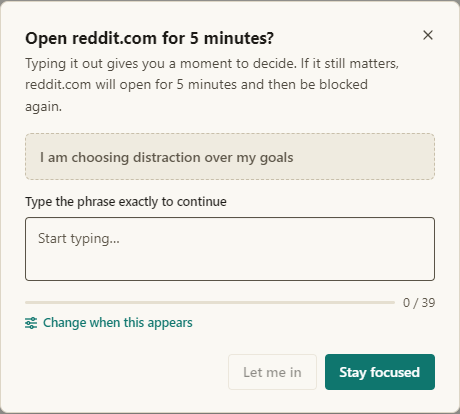
An optional pause before you loosen your blocking: breathe for 15 seconds, or type a phrase. Letting a blocked site through asks every time; for pausing and settings changes, one speed bump covers the next 5 minutes.
Lock
For up to 72 hours, nothing can be removed, paused or loosened, not even with your password. A lock can only be extended.
Strict focus
While a session runs, you can’t stop it early, pause it or unblock sites.
Password
Optional. It protects the options page and every weakening action except stopping or pausing a focus session. A forgotten password can’t be recovered.
A speed bump: a dialog titled “Open reddit.com for 5 minutes?” It shows the phrase “I am choosing distraction over my goals” and a box to type it into exactly, with the buttons Let me in and Stay focused.
Fig. 4 The typed kind of speed bump, one of two.

While locked

You can still tighten: add sites, turn on categories, start a session or lower a limit.

Privacy

The free version makes no network requests at all.

No ads and no analytics code. Your lists, statistics and saved links stay in Chrome on your device, and it never reads what’s on a page. It goes online only if you add a Plus license key or turn on sync, a Plus extra.

Read the privacy policy

What it can’t do

Stay Focused makes a distraction harder to reach, but it can’t make one impossible.

  • It can’t stop you removing it. Chrome always lets you manage your extensions, and other profiles, browsers and devices aren’t covered.
  • Incognito needs your permission. Until you turn on Allow in Incognito, blocked sites open normally there.
  • Only web pages, only on a computer. Chrome on Android and iOS doesn’t run extensions.

The full list is on the Support page

Optional extras

Free, and Plus

Stay Focused Plus is optional and adds extras only: scenes, accent colours, soundscapes, sync, advanced insights and your own quotes.

Pricing, and the full comparison

What it costs

Stay Focused
Free
Everything that blocks. No account. It stays free.
Plus, yearly
$19 per year
Renews every year until you cancel.
Plus, lifetime
$39 one-time
One payment — no subscription.

Plus is not on sale yet.

Prices in US dollars. Sales tax or VAT may be added at checkout. See the terms of sale and the refund policy.

When it goes on sale, Plus will be sold by Matthew Greengrass through Lemon Squeezy, the merchant of record, which handles payment, tax and receipts. Google is not the seller.

Questions

Good to know

More questions, and contact

Can Stay Focused see what I browse?

Only what limits and insights need, kept on your device: the hostnames you were turned away from and the time spent on each site. Daily records are deleted after 120 days.

Why does it ask for access to all sites?

Chrome only lets an extension redirect requests to sites it has access to, and any site might be on your list.